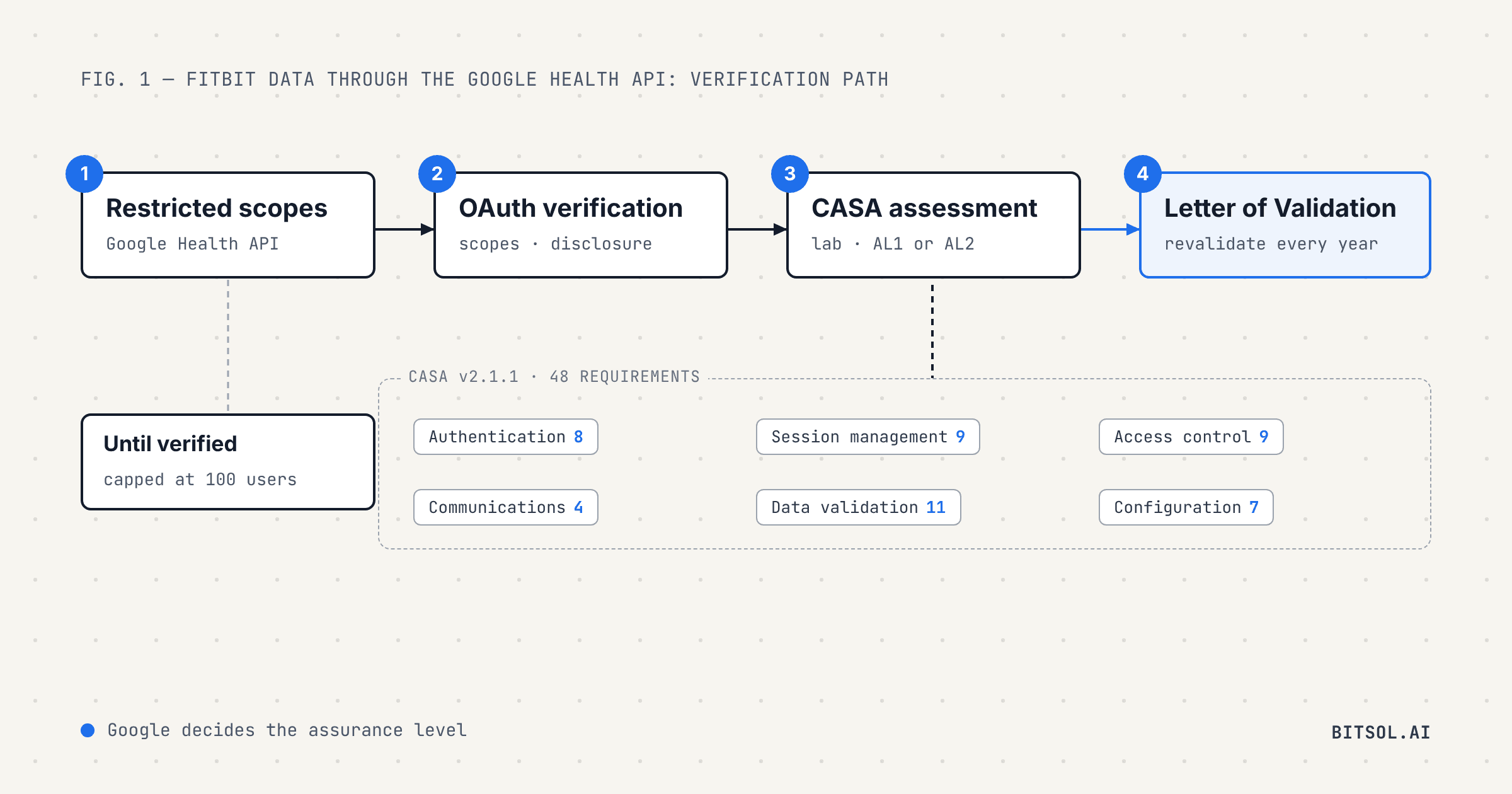
Fitbit integrations now come with a security test. Google has replaced the Fitbit Web API with the Google Health API, and the old API's turn-off date, November 2, 2026, has passed. Most Google Health API scopes are restricted. Until an app passes Google's OAuth verification and a security assessment under CASA, the App Defense Alliance's Cloud Application Security Assessment, it is limited to 100 users. The assessment has to be repeated every year.
This guide is for founders and engineering leads with a wearable integration on the roadmap or already in production. It covers what changed in the move to the Google Health API, what verification Google asks for, what the 48 CASA requirements cover, the difference between the two assurance levels, and a practical order of work for passing the first time.
What changed when Fitbit moved to the Google Health API
The Google Health API launched on March 24, 2026. Google describes it as the next generation of the Fitbit Web API, and it returns data from Fitbit devices and Google Pixel watches. The timeline for the old API moved once:
September 30, 2026: support for the legacy Fitbit Web API ended. Google's August 2026 developer newsletter had also given this as the turndown date.
November 2, 2026: the date Google set for turning off the legacy Fitbit Web API and the Fitbit OAuth endpoints. Google's migration guide says that after this date they no longer function or sync data to or from Fitbit users.
Both dates have now passed. Any integration still pointed at the legacy API needs to move to the Google Health API, and its users need to connect again.
The move is more than a change of endpoints. According to the migration guide, apps register a new client and use Google OAuth 2.0. Existing Fitbit tokens cannot be transferred, so every user has to consent again. Users also need a Google Health profile linked to their Google Account before data will sync, and an app must not keep a legacy Fitbit connection and a Google Health connection active for the same user at the same time.
For most teams the larger change is the review that now sits in front of production access.
What verification Google now asks for
Google's app verification page for the Google Health API states that most of its scopes are restricted. An app that requests them goes through two reviews:
OAuth app verification. Google's Trust and Safety team reviews the app's identity, the scopes it requests and the reason for each one. Google warns that vague or duplicate justifications slow verification down.
A security assessment. Apps using restricted scopes must also complete an annual security assessment by a third-party security firm, based on CASA. Google's general restricted scope rules tie the assessment to servers: if you store or transmit restricted scope data on servers, you need one.
Until both are done, the app is limited to 100 users. A listing on Google Play does not lift that cap.
Google also asks for an in-app disclosure. It has to appear inside the app during normal use, not only in the store description or on a website, and it has to say what data the app accesses and how that data is used or shared, without being bundled with unrelated disclosures. A privacy policy or terms of service alone does not meet the requirement.
What CASA is
CASA is the cloud application security standard maintained by the App Defense Alliance (ADA). Google launched the ADA in 2019, and in 2023 the Alliance moved under the Linux Foundation's Joint Development Foundation, with Google, Meta and Microsoft on its steering committee. CASA is built on the OWASP Application Security Verification Standard (ASVS).
The standard has become shorter and more focused. The ADA cut its requirements from 134 to 73 in 2023. The current CASA specification, version 2.1.1, dated June 3, 2026, has 48 requirements in six areas. Each requirement comes with an audit test that applies to the web application, its web and mobile APIs, or both.
AL1 and AL2: two levels of assurance
The ADA now describes two assurance levels. The 48 requirements are the same at both. What changes is how they are checked:
AL1: the authorized lab does not assess the application directly.
AL2: the lab evaluates each test case directly against the application, and the assessment covers the application, its deployment infrastructure and wherever user data is stored.
You do not choose the level. The ADA states that the framework user, in this case Google, decides which level an app needs. In our own CASA work for Fitbit health data, Google assigned AL2, the deeper level, so prepare as if you will be assessed at AL2.
Google's Google Health API verification page still uses the older tier names. It says the assessment takes two to three weeks for tier 2 applications and four to six weeks for tier 3, and that assessors charge from $500 to $4,500 depending on the app's complexity. After you pass, the assessor issues a Letter of Validation, which you submit to Google's Trust and Safety team. The ADA requires every application to be revalidated each year.
The 48 CASA requirements, area by area
The six areas below summarize the CASA v2.1.1 specification. They are short enough to review in one sitting, and they map closely to the security work a health app should already be doing.
Authentication (8 requirements): brute-force protection, random and short-lived initial credentials, password storage that resists offline attacks, no default credentials, and out-of-band verification codes that expire, work only once and cannot be guessed.
Session management (9): no passwords or session tokens in URLs, logout that invalidates refresh tokens, other sessions ended after a password change, stateless tokens that expire within 24 hours if they cannot be revoked, Secure and HttpOnly cookies, session tokens rather than static API keys, tamper-resistant tokens, and re-verification before sensitive actions.
Access control (9): least privilege enforced at a trusted service layer, users unable to change their own access rights, access controls that fail securely, protection against insecure direct object references, anti-CSRF and anti-automation controls, directory browsing off, only recommended OAuth 2.0 flows, validation of
redirect_uriandstate, and multi-factor authentication on admin interfaces.Communications (4): TLS 1.2 or higher by default, trusted certificates, no weak cryptography, and cryptographic modules that fail securely.
Data validation and sanitization (11): protection against database, OS command, XML and XPath injection, unsafe dynamic code execution, unsafe user input in templates, HTTP parameter pollution, cross-site scripting, server-side request forgery, open redirects, file inclusion and unsafe file uploads.
Configuration (7): no components with known exploitable vulnerabilities, debug modes off in production, no access decisions based on the Origin header, protection against subdomain takeover, no credentials or payment details in logs, session tokens hashed wherever they are logged, no sensitive data left in browser storage, and server-side secrets stored securely.
For a wearable integration, five requirements deserve attention before the lab arrives. Fitbit data arrives through OAuth, so requirements 3.2.1 and 3.2.2 test your OAuth flows, redirect URIs and state parameter. The Google Health tokens your server holds are secrets, which requirement 6.7.1 says must be stored securely. Requirement 3.1.4 tests for insecure direct object references, which matters wherever every record belongs to one user, as health records do. And requirement 3.3.1 asks for multi-factor authentication on the admin console your clinical or support team uses.
A practical order of work
Map where Fitbit data goes. List every service that stores or processes it: API, database, queues, analytics, logs, AI models. At AL2 the assessment covers the deployment infrastructure and every place user data is stored, so you need to know the full path.
Write the scope justifications. Request only the scopes the product uses, and explain each one in terms of a user-facing feature.
Build the in-app disclosure. Put it in the normal flow, before the user connects their account, and say plainly what data you read and why.
Review your app against the 48 requirements. Run an authenticated scan, fix the findings, and walk through each requirement with the engineer who owns that area. The CASA test guide shows how each one is tested.
Pick an authorized lab when Google tells you to start. Google's Trust and Safety team sends instructions when the assessment is due. The ADA publishes its list of authorized labs. Google accepts existing HITRUST, SOC 2 and ISO/IEC 27001 certifications that you have already completed, but you still need an authorized assessor.
Put the revalidation date in the calendar. Google's restricted scope rules require reassessment at least every 12 months to keep access to restricted scopes. Keep the owner and editor contacts in your Google Cloud project current so the reminder reaches the right person.
CASA and HIPAA are not the same thing
Passing CASA does not make an app HIPAA compliant, and HIPAA compliance does not replace CASA. CASA tests the security of the application and its APIs against a fixed list of requirements. HIPAA governs how covered entities and their business associates handle protected health information, from contracts to audit logs to breach notification. Wearable data in a consumer app may or may not be PHI. Our guide on whether HIPAA applies to your app explains how to tell.
The two still overlap. Teams that already follow the controls in our guides to HIPAA-compliant API design and HIPAA-compliant backend architecture will already have many of the CASA controls in place. CASA is more specific than the HIPAA Security Rule about session handling, OAuth and configuration, so check those areas first.
How Bitsol approaches CASA for wearable integrations
Bitsol builds healthcare software only, with 50+ healthcare products shipped, including several that connect to wearables. We took a women-centered wellness app that brings Oura, Apple Health, Health Connect and Fitbit data together with EHR records in one timeline through Google's security assessment for Fitbit health data. The app is live on the App Store and Google Play.
We design for the assessment from the first sprint: OAuth flows that follow current guidance, token storage and revocation, server-side access control on every health record, MFA on admin tools, and logging that keeps secrets out. That way the lab reviews controls that are already in place instead of a list of fixes. If you are planning a wearable integration, see how our 8-week HIPAA-compliant MVP launch works, or read our guide to FemTech app development for how wearable data fits into a women's health product.
Frequently asked questions
Does my app need a CASA assessment to use the Google Health API?
If it requests restricted scopes, yes. Google says most Google Health API scopes are restricted, and apps that use them must complete OAuth verification and an annual security assessment based on CASA. Until then the app is limited to 100 users.
How many requirements does CASA have?
The current CASA specification, version 2.1.1 from June 2026, has 48 requirements across six areas: authentication, session management, access control, communications, data validation and sanitization, and configuration.
What is the difference between CASA AL1 and AL2?
The requirements are the same. At AL1 the authorized lab does not assess the application directly. At AL2 the lab tests each requirement directly against the application. Google, not the developer, decides which level an app needs.
How long does a CASA assessment take, and what does it cost?
Google says two to three weeks for tier 2 applications and four to six weeks for tier 3, with assessor fees from $500 to $4,500 depending on complexity.
Does SOC 2, ISO 27001 or HIPAA compliance replace CASA?
No. Google accepts HITRUST, SOC 2 and ISO/IEC 27001 certifications you have already completed, but you still need an assessment by an authorized lab. HIPAA compliance is a separate obligation and does not substitute for CASA.