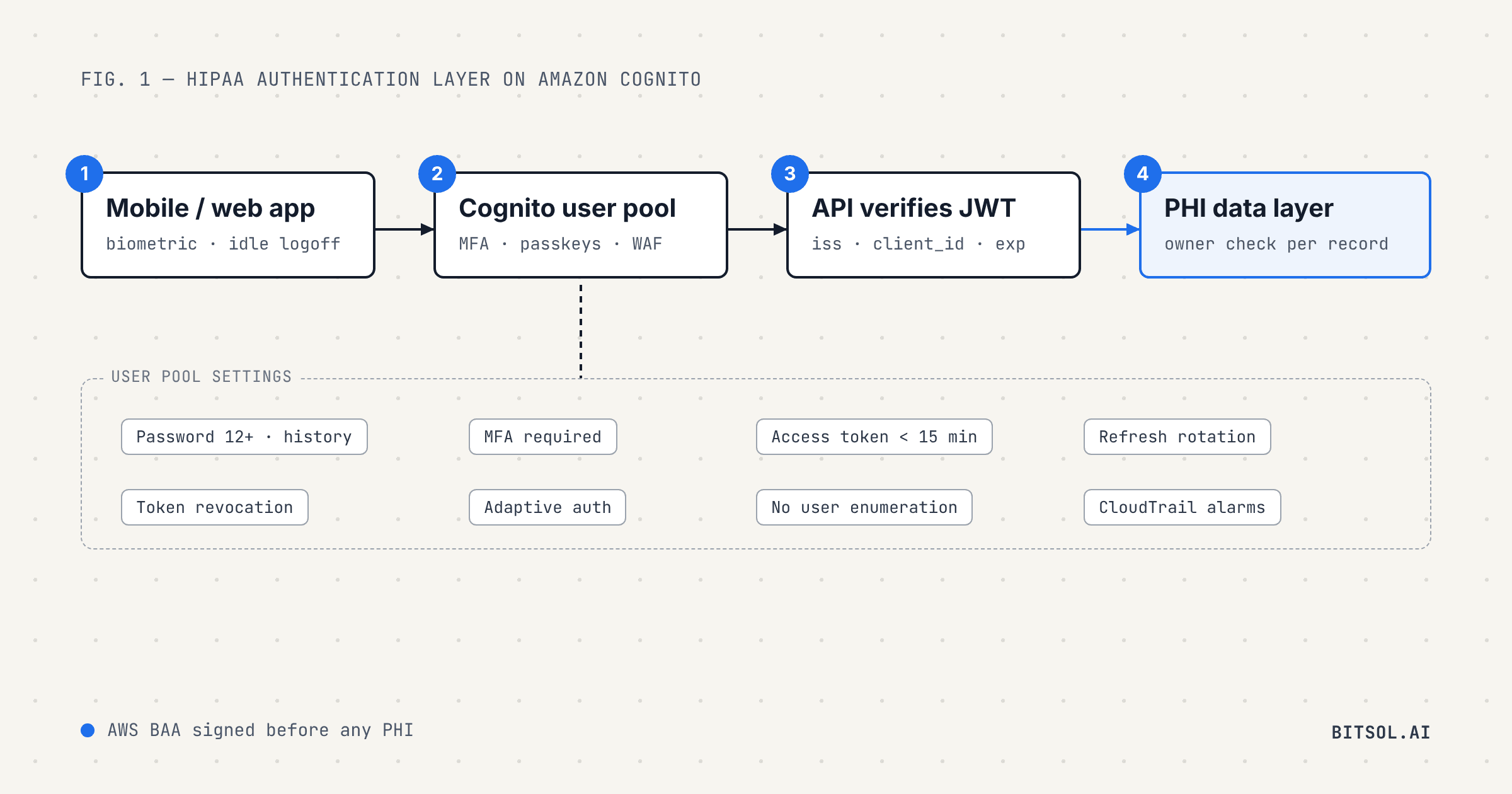
Authentication is where HIPAA's technical safeguards meet every user of your app. It decides who gets near protected health information, how long they stay signed in and what happens when a password leaks. Amazon Cognito gives you a managed identity provider that AWS includes in its HIPAA compliance program, but the defaults are not a HIPAA configuration. The settings you choose are what an auditor, a hospital security team or a lab assessor will look at.
This guide walks through building a HIPAA-compliant authentication layer with Cognito user pools, setting by setting. The requirements come from the HIPAA Security Rule, NIST and OWASP, and every Cognito limit and default comes from the AWS documentation.
What HIPAA asks of an authentication layer
The HIPAA Security Rule's technical safeguards set the requirements an authentication layer has to meet:
Person or entity authentication, §164.312(d): procedures to verify that a person seeking access to electronic PHI is the one claimed.
Unique user identification, §164.312(a)(2)(i), required: a unique name or number for identifying and tracking each user.
Automatic logoff, §164.312(a)(2)(iii), addressable: electronic procedures that end a session after a predetermined time of inactivity.
Audit controls, §164.312(b): mechanisms that record and examine activity in systems that contain electronic PHI.
The administrative safeguards add two addressable specifications that land on the same layer: log-in monitoring, §164.308(a)(5)(ii)(C), and password management, §164.308(a)(5)(ii)(D).
Addressable does not mean optional. Under §164.306(d)(3), you must assess each addressable specification and implement it if it is reasonable and appropriate. If it is not, you must document why and adopt an equivalent alternative where one is reasonable.
The current rule does not name multi-factor authentication. That may change. In a proposal published in January 2025, HHS set out an update to the Security Rule that would require multi-factor authentication, with limited exceptions. The proposal is not final, and the federal regulatory agenda now lists July 2027 as the expected date for final action. Building MFA in now avoids a retrofit later.
Cognito and HIPAA: what AWS covers and what you configure
AWS states that third-party auditors assess Cognito as part of several compliance programs, including HIPAA. Before Cognito handles PHI, your AWS account needs a signed business associate agreement with AWS: AWS's HIPAA eligible services reference says these services must not be used with PHI until you have one. Our guide on what a BAA must cover explains how this fits into your vendor chain.
After that, compliance depends on configuration. Two decisions shape everything else.
Choose the feature plan first. Cognito user pools come in three feature plans: Lite, Essentials and Plus. Several controls in this guide are not in Lite. Passkeys, email MFA, password history and refresh token rotation need Essentials or Plus. Compromised-credential detection, adaptive authentication and user activity logs need Plus.
Keep identity and clinical data apart. Separating the identity store from clinical data limits what a single breach can expose. In practice the user pool holds what sign-in needs, such as email, phone number and the user's unique sub, and clinical data lives in your own encrypted stores, keyed by that sub. Our guide to the 18 HIPAA identifiers shows why even sign-in attributes can be PHI once they sit next to health data.
The controls, setting by setting
1. Password policy
Cognito's password policy accepts a minimum length from 6 to 99 characters and can require lowercase letters, uppercase letters, numbers and symbols. With Essentials or Plus, password history can stop a user from reusing any of up to 24 previous passwords. Temporary passwords issued by an administrator expire after 7 days by default, and you can set the limit as high as 365 days.
For the policy itself, follow NIST SP 800-63B-4, which NIST published in final form in July 2025. It sets a minimum of 15 characters when a password is the only factor and 8 when it is part of multi-factor authentication. It says verifiers shall not impose composition rules, such as requiring a mix of character types, and shall not force periodic password changes, but shall check new passwords against a blocklist of commonly used, expected or compromised passwords. In Cognito terms: set the minimum length to match your MFA policy, leave the character-type requirements off, and enforce the same rules in the app so users never pass one check and fail the other. For the blocklist, Cognito's Plus plan offers compromised-credential detection, which compares passwords against lists of leaked credentials at sign-in, sign-up and password change. AWS notes that it does not check passwords in SRP or custom authentication flows.
2. Multi-factor authentication and passkeys
Cognito supports three second factors for password sign-in: SMS, email and a TOTP authenticator app. Email MFA needs the Essentials or Plus plan and your own Amazon SES configuration. MFA can be set to required, optional or off. When it is required, every user must register at least one factor before they can sign in.
Passkeys go further. The FIDO Alliance describes them as phishing-resistant, and Cognito supports them on every plan except Lite through the choice-based USER_AUTH sign-in flow. Four settings matter for a HIPAA app:
User verification: the default is preferred, which lets users register authenticators that cannot verify the user, such as with a biometric or PIN. Set it to required.
Passkeys as MFA: with
FactorConfigurationset toMULTI_FACTOR_WITH_USER_VERIFICATION, a passkey with user verification satisfies your MFA requirement on its own.Relying party ID: set it before launch. If it changes, every user has to register their passkey again.
Limits: each user can register up to 20 passkeys, and only after signing in at least once. Passkeys cannot be used as a second factor after a password.
Plan for two more cases: asking users to authenticate again before sensitive actions on PHI, and a recovery path for users who lose the device that holds their second factor.
3. Adaptive authentication
On the Plus plan, Cognito's adaptive authentication scores each sign-in as low, medium or high risk from its location and device information. For each level you choose a response: allow sign-in, ask for MFA if the user has it, require MFA and prompt the user to set it up, or block the sign-in, with an optional email to the user. A higher risk level cannot get a softer response than a lower one. AWS recommends running in audit-only mode for two weeks or more before switching to full-function mode, so you can see the risk scores before they block anyone.
4. Token lifetimes and refresh token rotation
Short tokens limit the damage from a stolen one. In Cognito, access and ID tokens last one hour by default, and you can set access tokens anywhere from 5 minutes to 1 day per app client. Refresh tokens last 30 days by default and can be set from 60 minutes to 10 years. Set access tokens as short as your app can comfortably refresh in the background. If you use Cognito's managed login pages, their session cookie can outlast a short access token, so sign-out has to clear it too.
Turn on refresh token rotation, which AWS added in April 2025 for the Essentials and Plus plans. Each refresh then returns a new refresh token and retires the old one, within the same fixed validity window. You can allow a grace period of up to 60 seconds for retries. In the app, let only one refresh run at a time, so two screens refreshing at once do not race each other for a rotated token. When a refresh fails because the token expired, was revoked or the password changed, the app fails closed and sends the user back to sign in.
5. OAuth flows and app client settings
If your app signs users in through Cognito's OAuth endpoints, the app client settings matter as much as the user pool. Cognito's authorization endpoint supports PKCE with the S256 method only, accepts only redirect URIs that are pre-registered with the app client, and requires HTTPS for them except on localhost. AWS calls the implicit grant less secure because it exposes tokens and potential identifying information to users, and recommends the authorization code grant. So: use the authorization code grant with PKCE, turn off the implicit grant, register exact callback URLs and send a state value with every request to guard against cross-site request forgery. The same rules apply to the third-party OAuth connections a health app makes, such as wearables and EHR aggregators.
6. Revocation and sign-out
Token revocation is on by default for new app clients. Revoking a refresh token also revokes the access and ID tokens Cognito issued when that refresh token was used. To end every session for a user, for example after a password change or a reported lost device, call GlobalSignOut or its admin equivalent.
There is a catch that matters for HIPAA. Cognito stops accepting revoked tokens in its own APIs, but AWS warns that other requests might be valid until the token expires. An API that only checks a token's signature and expiry offline cannot tell that it was revoked. AWS's advice is to check token status with Cognito or keep access token lifetimes short. You can do both: short access tokens, plus a revocation list on the server for sessions that must end at once. Cognito's access tokens carry an origin_jti claim that ties them to the refresh token they came from, which makes that list practical. If you use managed login, also send the browser to the logout endpoint, because GlobalSignOut does not clear the managed login session cookie.
7. Verify every token on the server
Your API, not the app, decides who sees PHI. AWS recommends its aws-jwt-verify library for Node.js and lists the checks every backend should run on every request:
the signature, against the user pool's public keys at its JWKS endpoint, refreshing the key cache when an unknown key ID appears;
the
expclaim, so expired tokens are rejected;the
issclaim, which must match your user pool;the
client_idclaim in access tokens, oraudin ID tokens, which must match your app client;the
token_useclaim, so an ID token cannot be used where an access token is expected.
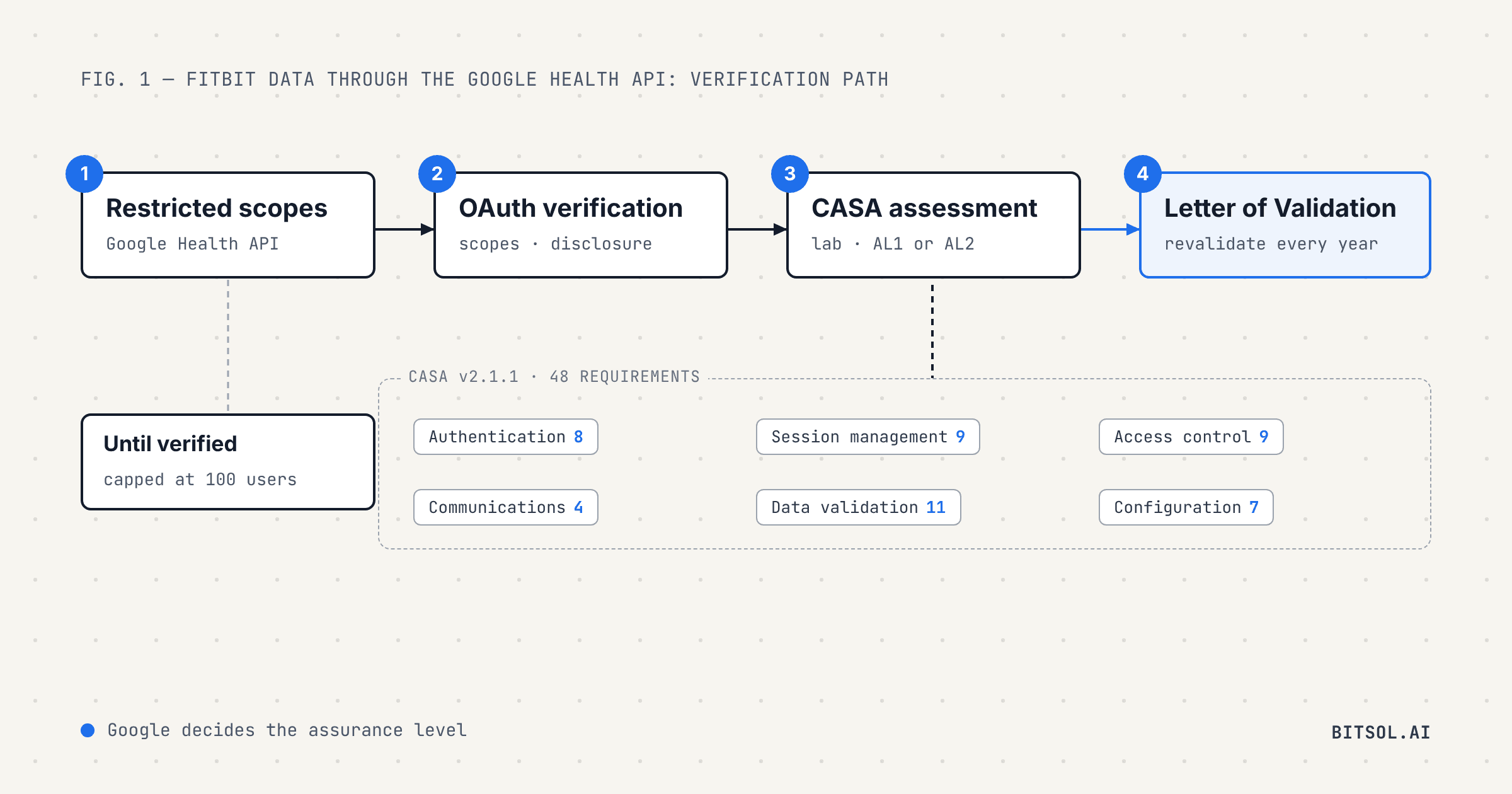
Accept these tokens as the only session credential. The CASA specification, which Google uses for apps that request restricted data, asks for session tokens rather than static API keys. Our guide to passing CASA for the Google Health API explains when Google asks for that assessment.
Then authorize at the data layer. Take the user's identity and role from the verified token, never from the request body, and check that the caller may access each record they ask for. Our guide to HIPAA-compliant API design covers the rest of the controls an API needs.
8. Automatic logoff
HIPAA makes automatic logoff addressable and does not set a time. NIST SP 800-63B-4 gives a benchmark: at authentication assurance level 2, the inactivity timeout should be no more than one hour, and at level 3 no more than 15 minutes. Choose a window that fits how your app is used, document it in your risk analysis, and warn users before the session ends. Run the idle timer on a monotonic clock, so changing the device clock cannot extend a session, and handle the app going into the background as well as idle time in the foreground. Pause, rather than end, flows the user started on purpose, such as connecting a wearable or an EHR account. On the web, clear cookies, local storage, session storage and IndexedDB at logout.
9. Biometric unlock and token storage on mobile
Biometrics on a phone unlock a stored credential. They do not replace authentication with Cognito. Make biometric unlock opt-in after a successful password sign-in, and keep the refresh token in a biometric-protected store:
iOS: a Keychain item protected with biometryCurrentSet, which Apple invalidates if fingers are added or removed for Touch ID or the user re-enrolls Face ID.
Android: a Keystore key that requires user authentication. Android's documentation says that, by default, such keys are invalidated when a new biometric is enrolled or all biometrics are deleted. Call
setInvalidatedByBiometricEnrollment(true)explicitly anyway, so the behavior is visible in code and survives refactoring.
If biometrics fail, are cancelled or the enrolled set changes, the app falls back to a password sign-in. Keep tokens out of plain app storage, URLs and query strings, and send them only over TLS, with no App Transport Security exceptions on iOS and no cleartext traffic in Android release builds.
10. Web sessions
On the web, the session lives in the browser. If you keep tokens in cookies, the OWASP Session Management Cheat Sheet calls for the Secure and HttpOnly attributes and an explicit SameSite=Strict or Lax, with CSRF protection on every state-changing request. Keep advertising and third-party analytics tags off the sign-in page and every authenticated page, so no vendor outside your BAA chain receives sign-in activity.
11. Brute force and account enumeration
By default, Cognito tells a caller when a username does not exist. Set PreventUserExistenceErrors to ENABLED on every app client, so sign-in returns a generic error and password recovery reports a code sent to a simulated destination. Then put AWS WAF in front of the user pool. You can associate one web ACL with each user pool, and it covers managed login endpoints and public API operations such as InitiateAuth. Requests that AWS WAF blocks do not count toward Cognito's rate quotas. For one-time codes, note that Cognito's sign-up confirmation codes are valid for 24 hours; a user whose code expires asks for a new one.
12. Logging and log-in monitoring
AWS CloudTrail records Cognito API calls and sign-in endpoint events, including sign-in, token, sign-out and passkey requests. Cognito replaces passwords and tokens in those events with HIDDEN_DUE_TO_SECURITY_REASONS and identifies users by sub rather than username. It does not mask personal information you put into other request fields, so keep PHI out of them. On the Plus plan, user activity logs add session properties and risk scores. Alarm on spikes in failed sign-ins and review them when they fire, which is the log-in monitoring §164.308(a)(5)(ii)(C) describes. Keep passwords, tokens and Authorization and Cookie headers out of your own logs and crash reports too.
13. Staff and admin access
Patients are not the only users. Every person on your team who can reach PHI needs a named account, which is what unique user identification under §164.312(a)(2)(i) asks for. Require MFA on the AWS console, CI/CD, admin panels and every production access path; CASA, for apps that need it, requires multi-factor authentication on admin interfaces. Avoid shared or generic logins, and remove access when someone leaves.
A configuration checklist for your authentication layer
AWS BAA signed before any PHI reaches the account.
Essentials plan at minimum; Plus for compromised-credential detection, adaptive authentication and activity logs.
Password policy following NIST SP 800-63B-4: 15+ characters without MFA or 8+ with it, no composition rules, no forced periodic changes, compromised passwords blocked.
MFA required, or passkeys with user verification required and
MULTI_FACTOR_WITH_USER_VERIFICATION.Short access tokens, refresh token rotation on, token revocation on, one refresh at a time per user.
Authorization code grant with PKCE, implicit grant off, exact callback URLs,
stateon every request.Every API verifies signature,
iss,client_idoraud,token_useandexp, then authorizes at the data layer.GlobalSignOut on password change and lost-device reports, with a server-side revocation list.
A documented idle and background timeout; biometric-protected token storage; TLS only.
Web cookies with Secure, HttpOnly and SameSite; CSRF protection; storage cleared at logout; no tracking tags on sign-in or authenticated pages.
PreventUserExistenceErrorsenabled and AWS WAF associated with the user pool.CloudTrail on, failed sign-in alarms in place, no PHI in request fields, secrets scrubbed from logs and crash reports.
Named accounts and MFA for every staff member with production or admin access.
How Bitsol builds HIPAA-compliant authentication
Bitsol builds healthcare software only, with 50+ healthcare products shipped. We design the authentication layer together with the backend controls in our guide to HIPAA-compliant backend architecture, so an enterprise security review finds them already in place. If you need a compliant first release quickly, see how our 8-week HIPAA-compliant MVP launch works.
Frequently asked questions
Is Amazon Cognito HIPAA compliant?
No service is HIPAA compliant on its own. AWS includes Cognito in its HIPAA compliance program, and you can use it with PHI once your account has a signed AWS business associate agreement. Whether your authentication layer meets HIPAA depends on how you configure it.
Does HIPAA require multi-factor authentication?
The current Security Rule requires person or entity authentication but does not name MFA. HHS proposed in January 2025 to require MFA with limited exceptions. That proposal is not final, and the federal regulatory agenda lists July 2027 as the expected date for final action.
Which Cognito feature plan does a HIPAA app need?
Essentials at minimum, for passkeys, email MFA, password history and refresh token rotation. Plus adds compromised-credential detection, adaptive authentication and user activity logs.
How long should Cognito tokens last in a healthcare app?
Cognito lets you set access tokens from 5 minutes to 1 day, with a default of one hour. AWS advises keeping access tokens short if you need revocation to take effect before they expire, so set them as short as your app can refresh comfortably, refresh in the background and turn on refresh token rotation.
Does signing out revoke Cognito tokens immediately?
GlobalSignOut and token revocation stop the tokens working with Cognito's own APIs at once. An API that only checks signatures and expiry offline can still accept a revoked access token until it expires, so keep access tokens short or check revocation on the server.