One of the most persistent problems in HealthTech is deceptively simple: patients already have health records, but your application can’t access them. Labs ordered last week, medications prescribed last year, diagnoses from a specialist — all locked inside siloed EHR systems from Epic, Cerner, Aetna, and dozens of others, each with their own APIs, authentication flows, and data formats.
The result? Clinical teams re-enter data by hand. Patients repeat their history at every touchpoint. Care decisions get made without the full picture. Recent survey evidence shows that only a small fraction of physicians report “ideal interoperability” when accessing external patient information in their EHRs (TechTarget, 2025) — for example, only 8–19 % of clinicians experience seamless access to outside test results or encounter documents, contributing to delays, duplicate tests, and incomplete clinical context during care.
This guide walks through what EHR integration actually involves — from the standards and security requirements to a full implementation pattern using Fasten Connect, a service that bridges your application to hundreds of health data sources through a single API.
Part 1: EHR Integration — What It Is and Why It Matters
1.1 What is EHR Integration and Why It Matters
Electronic Health Records (EHR) are digital records of a patient's health history — labs, medications, diagnoses, procedures, immunizations, and more — held by providers and payers such as Epic, Cerner, and Aetna.
Integrating EHR data into your application means your product can use a patient's existing health history instead of asking them to re-enter it. The practical benefits are significant: better care coordination, fewer data-entry errors, and true continuity of care across providers. For HealthTech products in particular, EHR integration is often the difference between a useful tool and a clinically trusted one.
The challenge is scale. Each health system has its own APIs, authorization schemes, and data formats. Building and maintaining direct integrations with even a handful of providers is costly and complex — which is why aggregation layers like Fasten Connect have become a practical standard.
1.2 What EHR Integration Typically Involves
A complete EHR integration covers several interconnected concerns:
Connection: A secure link between your application and the source of the patient's records (provider or payer portal)
Authorization: The patient (or an authorized representative) must explicitly consent and authenticate with their EHR or portal — your app never handles their credentials
Data types: Labs, medications, conditions, procedures, immunizations, allergies, vital signs, care plans, and continuity-of-care documents (CCD)
Standards: Health data is exchanged in standard formats — primarily FHIR R4 and USCDI — so different systems can interpret it consistently
Sync: An initial pull of data when the user connects, plus optional ongoing sync to capture updates
Security and compliance: Access control, audit logging, encryption, and policies that support HIPAA and patient consent
1.3 High-Level Flow
At a generic level, the EHR connection flow works as follows:
The user chooses to connect their health records from within your app
Your app sends the user to a secure connection flow — often an embedded widget or redirect
The user selects their provider or payer, signs in, and authorizes sharing
The connection provider notifies your backend via webhook
Your backend requests and/or receives the patient's data (via bulk export or API call)
Your app stores and displays the data according to your product design and compliance requirements
1.4 What You Need to Deliver EHR Integration
To build this end-to-end, your team needs four things in place:
Backend: Store connections (who is connected, status, identifiers), call the data provider's API, receive webhooks, and persist and serve data
Frontend: An entry point to start the connection (e.g., "Connect health records"), connection status display, and a way to view or use imported data
Credentials: API keys from the connection or data provider, with separate test and production credentials where available
Webhooks: A public URL where the provider can send events (connection created, data ready, expired, etc.)
Data model: Tables or stores for connection metadata and imported health data (with type, source, and timestamps)
Security: Role-based access, audit logging, no PHI in logs, encryption in transit and at rest
Part 2: Fasten Connect Integration — A Practical Implementation Guide
2.1 What Fasten Connect Is
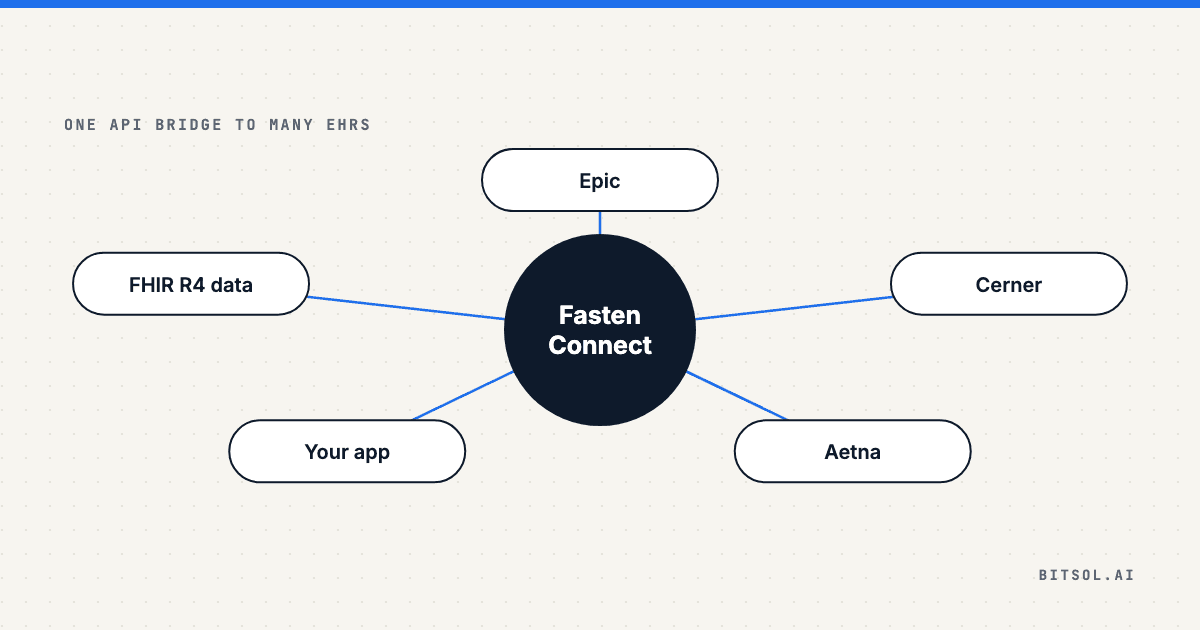
Rather than building separate integrations to each EHR vendor, Fasten Health (Fasten Connect) provides a single bridge to many sources. Your application integrates once with Fasten; Fasten handles provider‑specific connections, authentication, and data retrieval across Epic, Cerner, Aetna, and other supported systems.
The outcome: users can connect their health records from any supported provider, and your app receives structured FHIR R4 data to store and display — without you building or maintaining per-vendor integration code.
2.2 What You Need Before You Start
Fasten Health developer account (Fasten Health Developer Portal)
Backend API (any stack; the examples here use NestJS)
Frontend (any stack; examples use React)
PostgreSQL database for connections and health data
Public URL for webhooks (required for production; use a tunnel like ngrok for local development)
2.3 Credentials and Environment
Fasten uses two credential types that must be kept strictly separated:
Credential
Format
Where It Lives
Public ID
pub_test__ or pub_live_
Frontend only (e.g., VITE_FASTEN_PUBLIC_ID)
Private key
priv_test_ or priv_live_
Backend only — never in frontend or version control
Webhook secret
From Fasten portal
Backend only — used to verify webhook signatures
API base URL: https://api.connect.fastenhealth.com/v1
2.4 End-to-End Flow
User starts connection – User clicks a "Connect health records" control in your app
Backend creates pending connection – Calls POST /api/fasten-health/connections/initiate
Widget loads – Frontend loads Fasten Connect widget (Stitch.js)
User authorizes – Selects provider, logs in, authorizes sharing
Widget completes – Fires event with connection metadata
Frontend sends completion to backend – Calls POST /api/fasten-health/connections/complete
Backend requests bulk export (EHI) – Calls Fasten’s EHI export API
Fasten sends webhook when export is ready – patient.ehi_export_success webhook received
Backend downloads and processes data – Parses JSONL FHIR resources and stores them
Data available in your app – UI shows connection status and imported records
2.5 Backend API Surface
Your backend typically exposes these endpoints to support the full flow:
POST /connections/initiate – Start connection
POST /connections/complete – Save connection after widget completion
GET /connections/:patientId – Connection status
POST /sync/:patientId – Trigger sync
POST /bulk-export/:patientId – Manually request EHI export
GET /data/:patientId – Get imported data
GET /data/:patientId/:dataType – Get filtered data
DELETE /connections/:patientId – Revoke connection
POST /webhook – Receives Fasten callbacks
Path prefix (e.g. /api/fasten-health) is determined by your application.
2.6 Webhooks from Fasten (H3)
Endpoint: Publicly reachable, verified using x-fasten-signature
Event types: connection.created, connection.updated, connection.expired, connection.revoked, data.available, patient.ehi_export_success, patient.ehi_export_failed
Handling pattern: Verify signature, read event type, update status, trigger download
2.7 Data Format and Storage
All data delivered as FHIR R4, USCDI-aligned
Bulk exports in JSONL (one resource per line)
Categories: CCD, labs, medications, procedures, immunizations, care plans, conditions, allergies, vitals
Recommended storage schema:
Field
Description
Patient/user ID
Identifier
Connection ID
Fasten connection
Data type
Lab, medication, etc.
Raw JSON payload
Original FHIR resource
Optional transformed payload
Normalized structure
Metadata
Source system, date retrieved, FHIR version
2.8 Security and HIPAA Compliance
Access control for authorized roles
Audit logging without PHI
Private key and webhook secret only on backend
HTTPS only; verify webhook signatures
For the controls behind these safeguards, see our guides to HIPAA-compliant API design and HIPAA-compliant backend architecture.
Frequently Asked Questions About EHR API Integration
What is EHR API integration?
EHR API integration connects your application to the health records that providers and payers hold for a patient, so your product can use their existing history instead of asking them to re-enter it. The data typically arrives as FHIR R4, aligned with USCDI.
How does a patient connect their records to my app?
The patient chooses to connect from within your app, selects their provider or payer, signs in and authorizes sharing. Your app never handles their credentials. The connection provider then notifies your backend by webhook, and your backend requests the data.
Do I need a separate integration for each EHR?
Not if you use an aggregation layer. Fasten Connect provides a single bridge: your application integrates once, and Fasten handles provider-specific connections, authentication and data retrieval across Epic, Cerner, Aetna and other supported systems.
What data format does an EHR API return?
Data is delivered as FHIR R4 and aligned with USCDI. Bulk exports arrive as JSONL, with one resource per line, covering categories such as labs, medications, conditions, procedures, immunizations, allergies and vitals.
How do you keep EHR integration HIPAA-compliant?
Limit access to authorized roles, log access without recording PHI, keep the private key and webhook secret on the backend only, use HTTPS and verify webhook signatures. Our guide to HIPAA-compliant API development covers the eight controls we build into every healthcare API.
How Bitsol Approaches EHR Integration
Building a reliable EHR integration isn't just a technical problem — it's a compliance, architecture, and product problem simultaneously. At Bitsol, our team has implemented EHR and Healthcare API integrations across health systems, digital health startups, and care coordination platforms, with HIPAA compliance built into the architecture from day one.
We work with FHIR R4, HL7, and aggregation layers like Fasten Connect to help teams move from fragmented data to connected, actionable health records — without rebuilding the integration layer every time a new EHR vendor appears. To see how connected records become AI-ready, read about our Health Data Layer.
EHR/EMR integration team
Healthcare API engineers
Explore how Bitsol approaches EHR and health data integration
Conclusion: Integration Is the Foundation
EHR integration is not a feature — it's infrastructure. Every clinical workflow, care coordination tool, and patient-facing application that operates on incomplete data is operating with one hand tied. The standards exist (FHIR R4, USCDI), the aggregation tools are mature (Fasten Connect), and the implementation patterns are well-understood. The organizations that get this right don’t just build better products — they become trusted partners in care. Health data connectivity isn't a future investment. For HealthTech teams building today, it's the baseline. Explore Bitsol solutions →